Tutorial5 Week 6
Identifying needs further
A. Practical Exercises
Activity 1: Answer online Survey:
Done
Activity 2: Creating an online survey:
Create a survey with at least 5 questions (try to use different question styles). The survey can be on any reasonable topic that you have an interest in (eg. hobby, sport, uni assignment). Survey at least 5 people. Aim for people who are involved or interested in the same topic (ie. don’t just use uni friends if this is not appropriate). Report the results of your survey.(Don’t forget to let the reader know what the purpose of the survey was. Use fully labelled graphs where appropriate)
Survey Undertaken:
The survey taken was to get some insights on what people thought about their communication skills.
Title of survey:
Communication Skills
Survey Questions:
1. An you make a conclusive judgement about someone’s bodys language?
- Yes
- No
- Maybe
2. When you get up to a speech what happens to you?
|
|
|
|
|
|
|
|
|
|
|
|
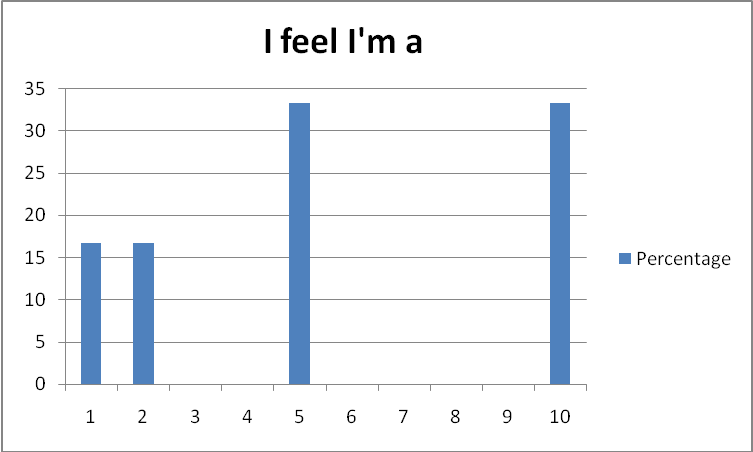
I feel I’m 1 2 3 4 5 6 7 8 9 10
- Yes
- No
The following are the results of the survey:
In total there were 6 people who answered the survey; the following is the results from the survey (in percentages)
For question 1
50% of people answered Yes
16.7% of people answered No
33.3% of people answered Maybe
For question 2
As there were multiple answers for this question the graph below shows the results:
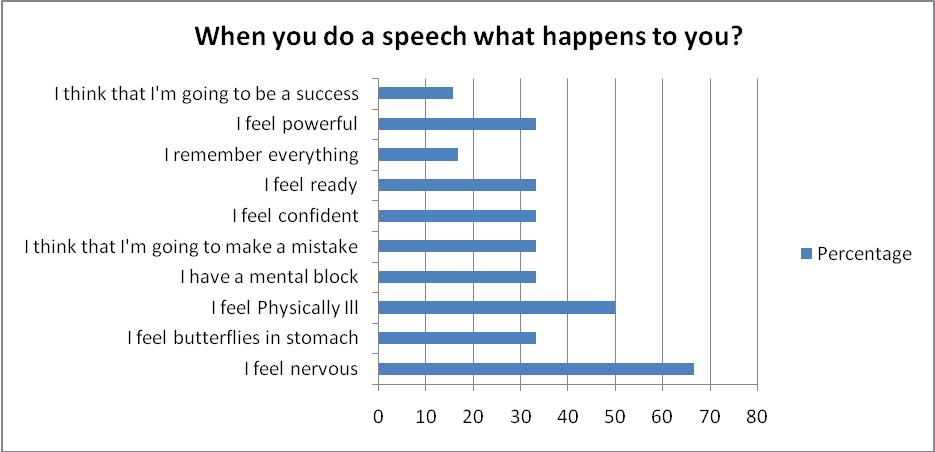
For question 3 As there were multiple answers for this question the graph below shows the results
For Question 4
100% of people answered Yes
0% of people answered No
For Question 5
As this was an open question for response only the amount of responses
3 people responded out of the 6 that did the survey.
Survey Undertaken
The survey was taken to get an insight in what people think about logging exercise and their overall thinking what is exercise.
Title of survey:
My Exercise Log
Survey Questions:
- What do you class as exercise?
Open answer
- Do you perform exercise?
- Yes
- No
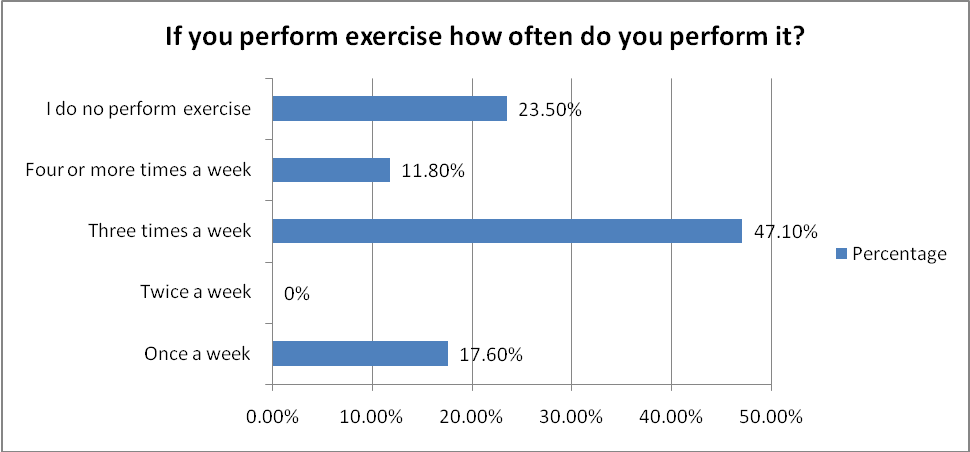
- If you perform exercise how often do you perform it?
- Once a week
- Twice a week
- Three times a week
- For or more times a week
- I do no perform exercise
- Have you ever logged exercise?
- Yes
- No
- Would you log exercise if you knew how?
- Yes
- No
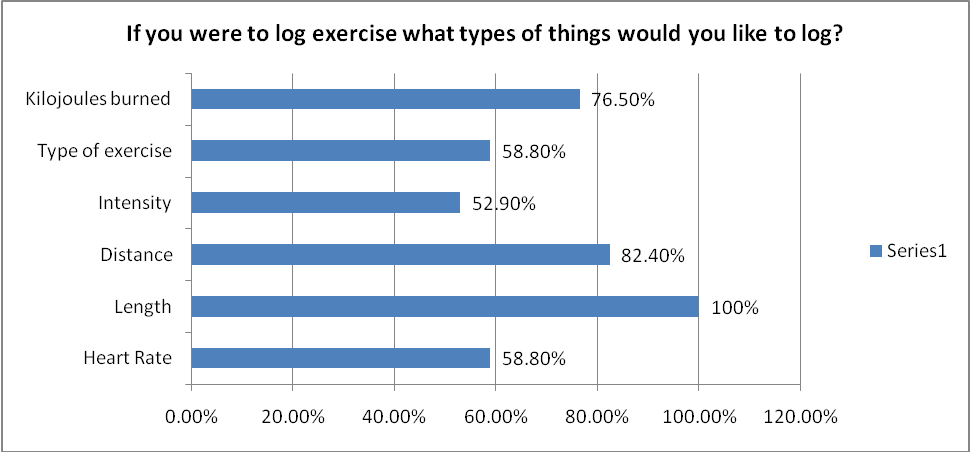
- If you were to log exercise what types of things would you like to log?
- Heart Rate
- Length
- Distance
- Intensity
- Type of Exercise
- Kilojoules burned
- When presented with exercise results how would you like them presented?
- Raw
- Facts and Figures
- Charts/Graphs
- All of the Above
- What type of exercise do you do?
- Walking
- Running
- Cyling
- Weight Training
- Other
- Don’t Perform Exercise
- If you were to scale yourself on how well you can use a computer 1 for being illiterate and 10 being expert where would you lie?
- 1
- 2
- 3
- 4
- 5
- 6
- 7
- 8
- 9
- 10
- If a site allowed you to log your exercise, how often would you login to log your exercise?
- Everyday
- Once a week
- Once a month
- Less than once a month.
The following are the results of the survey:
In total there were 17 people who answered the survey. These people were retrieved through social networking sites that are known to have interest in exercise
For Question 1:
As this question was a open question only the amount of responses are below:
Out of the 17 people who answered 15 people answered this question.
For Question 2:
76.5% of people answered Yes to this question
23.5% of people answered No to this question
For Question 3:
As this question has multiple responses the graph below shows the results:
47.1% of people answered Yes to this question
52.9% of people answered No to this question
For Question 5:
94.1% of people answered Yes to to this question
5.9% of people answered No to this question
For Question 6:
As this question has multiple responses the graph below show the results:
For question 7:
As this question has multiple responses the graph below shows the results:
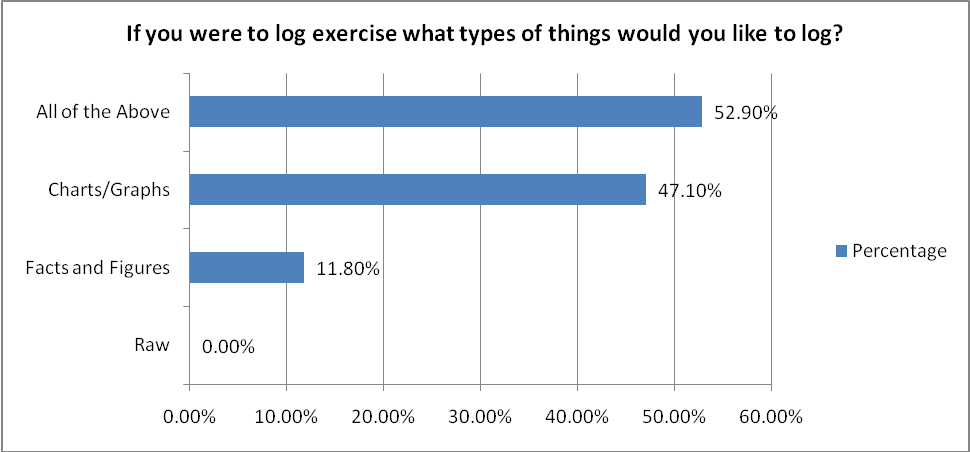
For question 8:
As this question has multiple responses the graph below shows the results:
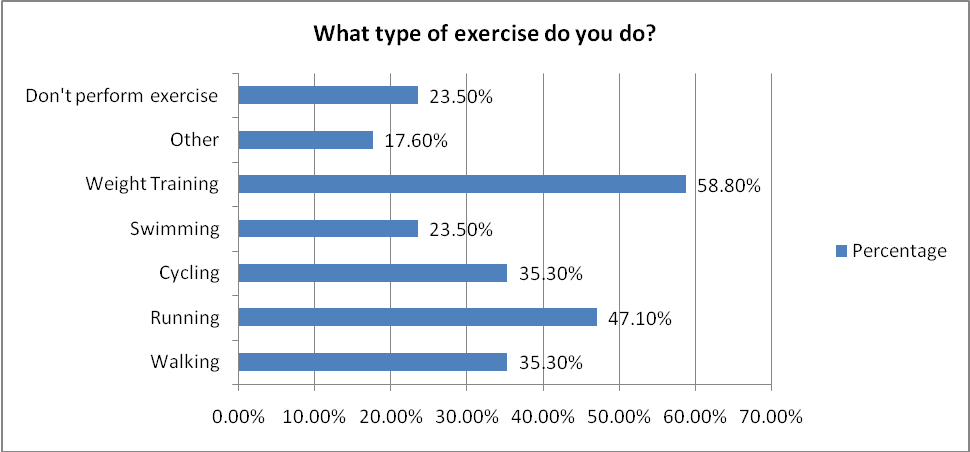
For question 9:
As this question has multiple responses the graph below shows the results:
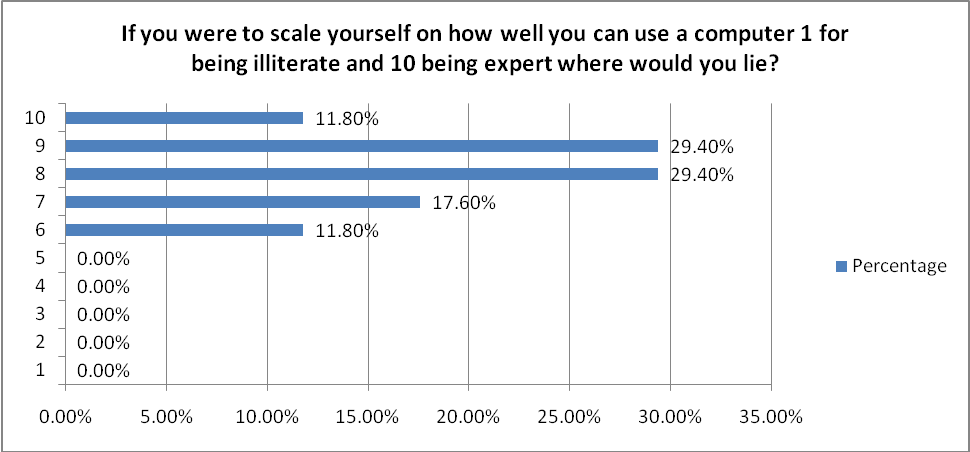
For question 10:
As this question has multiple responses the graph below shows the results:
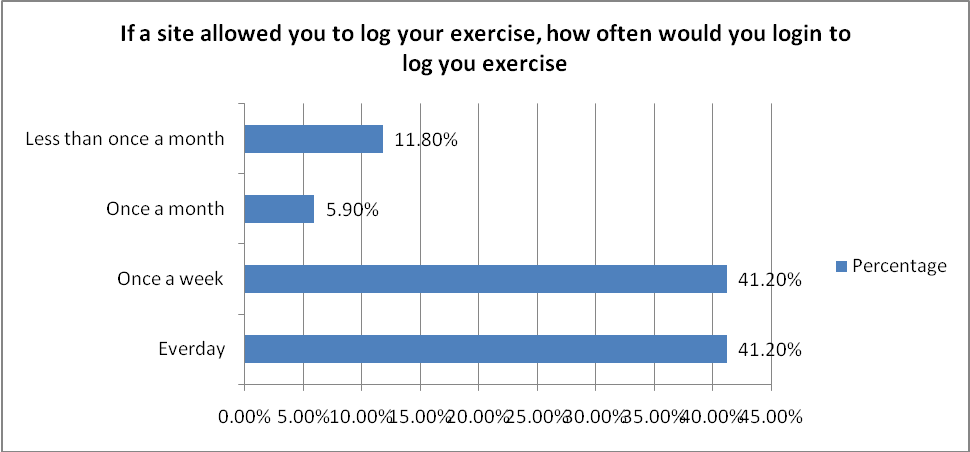
Activity3: manual Card Sorting
Card sorting is a technique that many information architects use as an input to the structure of a site
or product. Card sorting is a quick, inexpensive, and reliable method, which serves as input into your
information design process.
Card sorting can help identify trends, such as:
- Do the users want to see the information grouped by subject, process, business group, or information type?
- How similar are their needs?
- How different are their needs?
- How many potential main categories are there? (typically relates to navigation)
- What should those groups be called?
Card sorting can help answer these types of questions, making you better equipped to tackle the
information design phase.
After going through the online tutorial, set up your own paper-based card sorting exercise for a
website of your choice. (If you are building a website for your project then this exercise should be
done for that). Work in groups of about 4 with each student gathering data for their own choice of
website (i.e. you will be a researcher for one website and a participant in the card sorting exercise
for 3 other students).
Report your findings.
I found that something that I thought was quite straight forward and belonged in a certain group wasn’t so. Some of the individuals that I did this with placed items in categories in which I wouldn’t have placed them in, which is valuable insight to what others think and we can get a proper structure to the content.
Activity 4: Automatic card sorting
Repeat the exercise with different students (or other participants) using the free automated version available at http://websort.net – the free version is limited to 10 participants. You will need to register to use the service so you may want to use a hotmail or gmail account to sign up.
Report your findings.
Discuss the advantages and disadvantages of the automatic method compared to the manual method.
I found that I got the same kind of results, but with one major difference, they results took longer to come in. The reason for this I believe is because there is a bit of lag time from when you send the link until someone clicks on the link.
There are advantages to the automated system they are below:
- You don’t have to gather people face-to-face the participants can do it in the comfort of their own home
- The results are already documented for you and you can represent the results in different ways from the automated system.
- The results have not been influenced in any way by you being in the room, it is more of a personal judgment by the participants because you are not their looking over their shoulders.
The disadvantages to the automated system are below:
- There is more of a learning curve to the system, especially for people who are computer illiterate.
- There is a lag time from sending the link to the participant clicking on the link
- The automated system is via a plug-in in the browser, if a participant doesn’t have the plug-in they have to be diverted to download it, which might discourage them to continue.
- Because you have to send the link off to a potential participant you will have a lower conversion rate, as the user does not have to click the link.
B. Independent Exercises
Activity 4: Assignment Chapter 10
For this assignment you should:
Identify user’s needs. You can do this in a number of ways. For example, you could observe people using similar applications, think about your own experience of using them, and look at existing applications, interview friends and family about their experiences and so on. Record your data carefully.- User must be able to log their exercise
- User must be able to view their progress
- User must be able to view their exercise history
- User must be able to choose the data in which they want to log
- The system cannot be complicated it has to be easy and fast to use
- The system must provide some information on how to correctly log exercise
- As user can create their own profile.
- The types of feedback from the system regarding progress has to be simple and yet still complicated.
- The system will produce graphs and charts.
Based on your user requirements, choose two different user profiles, capturing how the user is expected to interact with the system.
The two user profiles are expert user and novice user.
The expert user will log more detailed information where a novice user will not use all aspects of the site and will most probably just log time and distance.
- Perform exercise and take note of what was done
- Turn on a internet enabled computer
- Navigate to Exercise Logging Site
- Log into site with user credentials
- Add new Session of Exercise
- Enter in name of exercise
- Select which data wanted for recording
- Enter in recorded Data
- Save Session
- Click View Progress
- Get feedback from presented data from progress page
- Logout of site
- Turn off computer
Functional:
- Add exercise
- Edit exercise
- Remove exercise
- Add exercise Session
- Remove Exercise Session
- Edit Exercise Session
- Create Chart
- Display Progress Chart
- Display Facts of Exercise Data
- User to log in
- User to log out
- User to register
Non-functional:
- Operate in all major internet browsers
- Accessible by any computer connected to the internet
